
Blank Test Data Form
Please download the blank Test Data form using the button below.
This form is required for us to prepare your customised auto-marking file.
After completing the form:
Fill in all required fields clearly
Save the completed form
Email the form to support@autotick.com
Please include your Stripe payment reference in your email
Processing will begin once your payment is verified.
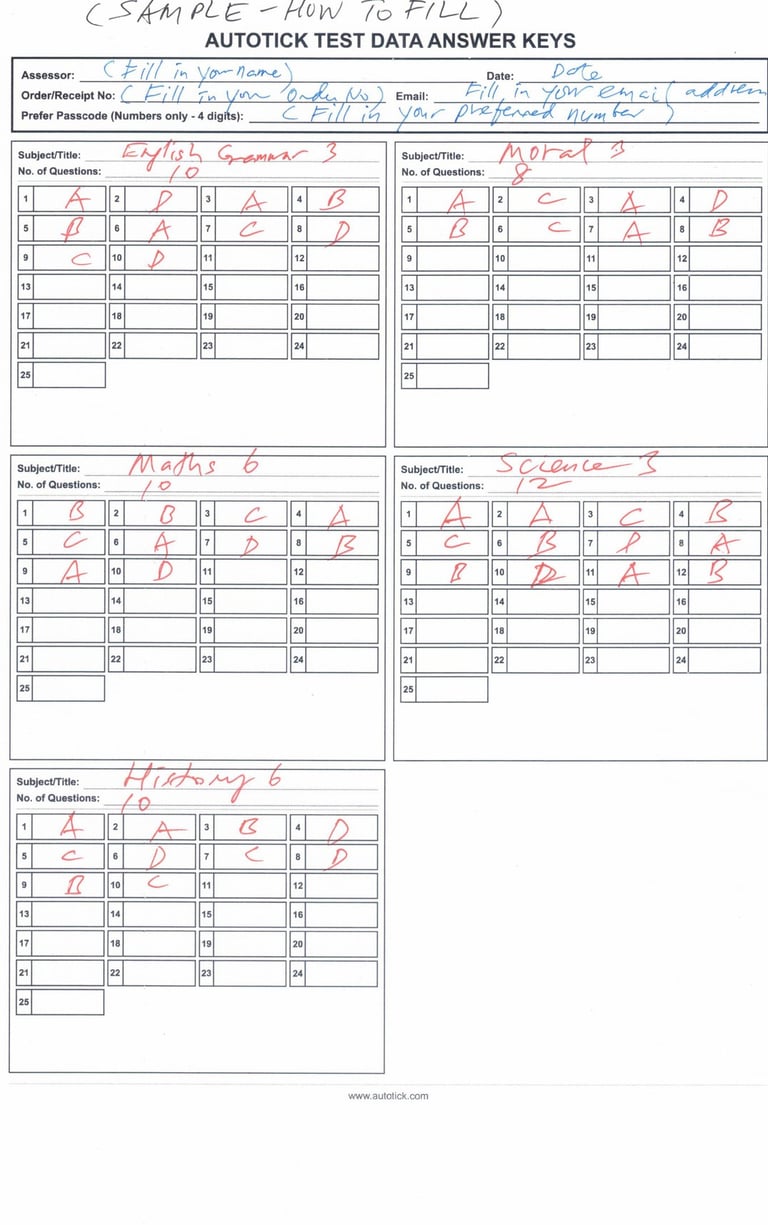
This is how to fill up the Test Data
Each order includes five (5) tests, each with its own set of answer boxes.
Each test contains questions numbered 1 to 25, with an answer box next to each question.
For each test, enter the subject name, the number of questions requested, and the corresponding correct answers.
Please enter your preferred passcode (numbers only, 4 digits).
Answers can be entered as A, B, C, D or 1, 2, 3, 4, depending on the objective answer options provided.
Please refer to the sample below for guidance.
AutoTick Marking
Home | How Autotick Works | FAQ | Order Now | About Us
Privacy Policy : https://autotick.com/privacy-policy
Terms & Conditions : https://autotick.com/terms-and-conditions
Support: support@autotick.com